

Software products reaching their End of Support (EOS) dates pose major challenges to critical system protection. Unsupported systems like Windows 2000 and NT 4.0 account for almost half of all critical vulnerabilities (213 of 448). The highest severity categories contain three-quarters of these vulnerabilities. Organizations must deal with 13-16 patch cycles each year on the monthly Patch Tuesday schedule, plus several emergency patches.
A big change awaits many security teams. Symantec Critical System Protection (CSP) will start its End-of-Life process on February 28, 2025. New sales will stop after this date and support will end without extended options. Organizations depending on this security solution need to prepare for this transition. Companies use Symantec Critical System Protection to protect their physical and virtual data centers through detailed policy-based controls. CSP has helped organizations protect their heterogeneous server environments and critical information with host-based intrusion detection, prevention capabilities, and least privilege access control.
This piece looks at how critical system protection will change as we approach 2025. Security teams must understand the key patterns needed to protect high-stakes infrastructure during this transition.
Security Risks in Unsupported Infrastructure (2025 Outlook)
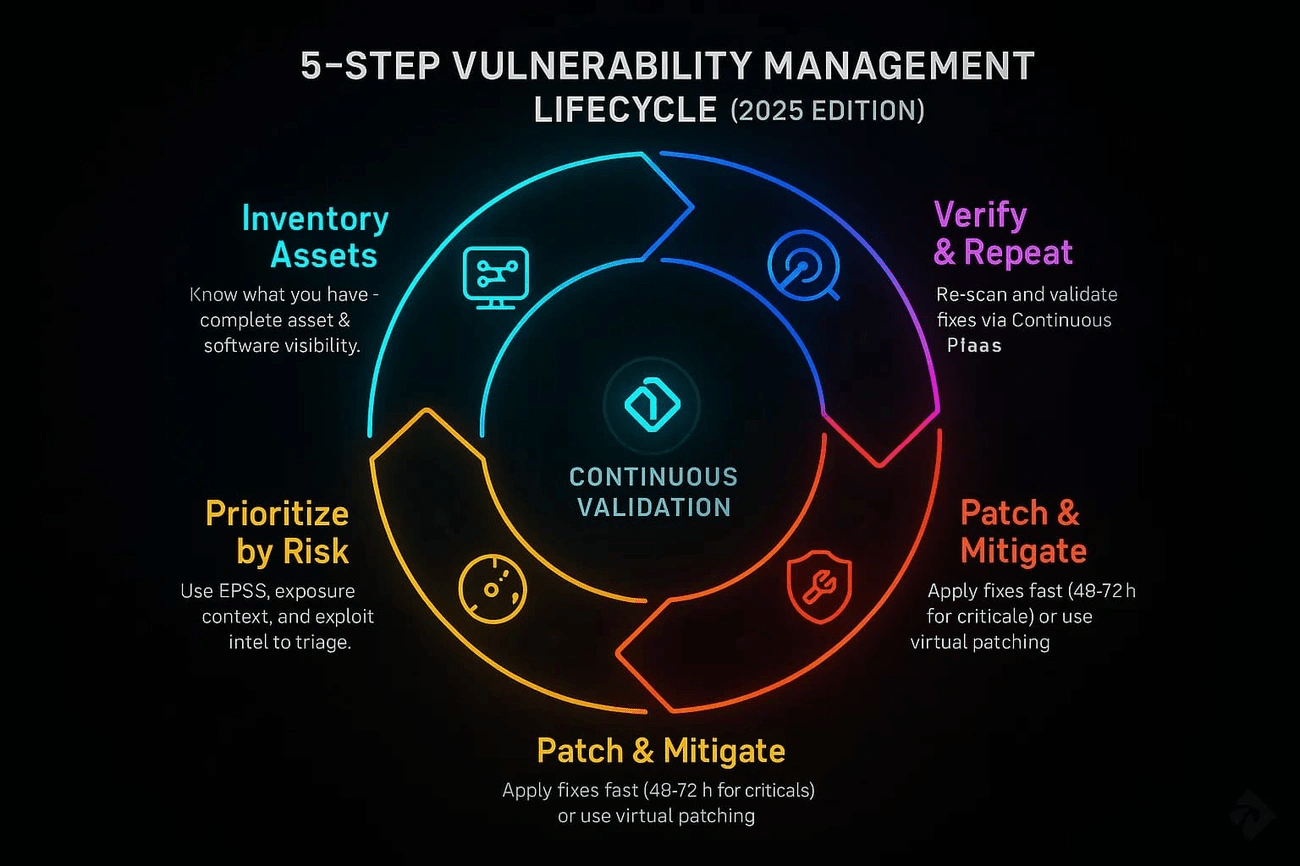
Image Source: DeepStrike
Organizations face a serious security weakness from aging infrastructure as we approach 2025. Today’s cybercriminals prefer to target outdated systems instead of going after an organization’s most valuable assets. This approach lets them find weak spots that can open doors to bigger targets.
Microsoft Support Lifecycle: End-of-Life Implications
Windows 10’s support will end on October 14, 2025. This marks one of the most important milestones for enterprise security teams. Security updates, bug fixes, and technical help will stop for many Windows 10 versions after this date. These include Enterprise, Education, Home, Pro, and IoT Enterprise. Windows 10 Enterprise LTSB 2015 and Windows 10 Team for Surface Hub will also reach their end-of-life at the same time.
The risks go beyond losing new features. Systems without support become vulnerable assets that create huge business risks. Security patches stop coming in, which makes endpoint security tools less effective. Teams find it harder to maintain audit trails and compliance reports. Microsoft’s Digital Defense Report shows that over 90% of ransomware attacks leading to encryption start with devices that lack proper security controls. On top of that, it shows that more than 90% of successful ransomware attacks use unmanaged endpoints. Old operating systems create gaps that standard EDR and XDR solutions can’t protect.
Windows 10 computers will keep running after October 2025. However, they won’t have technical support, software updates, or security patches. This makes them much more vulnerable to malware and other threats.
Custom Support Contracts: Cost and Limitations
Microsoft offers Custom Support Agreements (CSAs) as a short-term fix for organizations that can’t upgrade in time. These agreements are only available to Microsoft Premier Support customers. They provide Critical and Important security updates, but Important updates cost extra.
CSAs shouldn’t replace proper migration plans. Updates through these agreements need manual installation because they don’t come through Windows Update. More than that, products in extended support might not get fixes for all future security problems.
Microsoft provides Extended Security Updates (ESU) for Windows 10 as a temporary solution until October 2026. This option doesn’t include new features or long-term support. Third-party vendors might also stop certifying their products for Windows 10. Microsoft has made it clear that ESU exists to give organizations time to migrate, not to keep using old platforms forever.
Putting off upgrades costs a lot of money. McKinsey’s research shows that good modernization programs can speed up IT projects by 40–50% and cut technology debt costs by 40%. Technical debt usually takes up 20-40% of technology budgets, forcing teams to focus on maintenance instead of breakthroughs.
Zero-Day Vulnerabilities in Legacy Systems
Old systems are especially vulnerable to zero-day flaws—unknown software problems that attackers can use before patches exist. Google’s security researchers found 75 zero-day vulnerabilities being used in 2024, with 44% targeting business products.
Zero-days in unsupported systems are dangerous because vendors won’t provide patches. To name just one example, see CVE-2025-29824, a zero-day flaw in the Common Log File System driver. Attackers used this to gain more access on compromised machines, install backdoors, and launch ransomware attacks. The attacks hit many industries including IT, real estate, finance, retail, and software development.
Old hardware creates unique challenges with zero-day vulnerabilities. These devices often stay active in networks but get no security updates, making them perfect targets. European organizations using old infrastructure because of budget limits or operational needs face high risks. This is especially true in critical areas like energy, transportation, and healthcare.
Zero-day vulnerabilities go through several stages: flaws appear during development, attackers or researchers find them, exploitation begins, systems stay vulnerable until patches exist, and finally patches get developed. Unsupported systems never reach the final stage—leaving them always open to known attacks.
Organizations should use detailed hardware tracking, network separation, strict access rules, and backup protection like virtual patching when replacement isn’t possible.
Vulnerability Trends and Patch Cycle Challenges
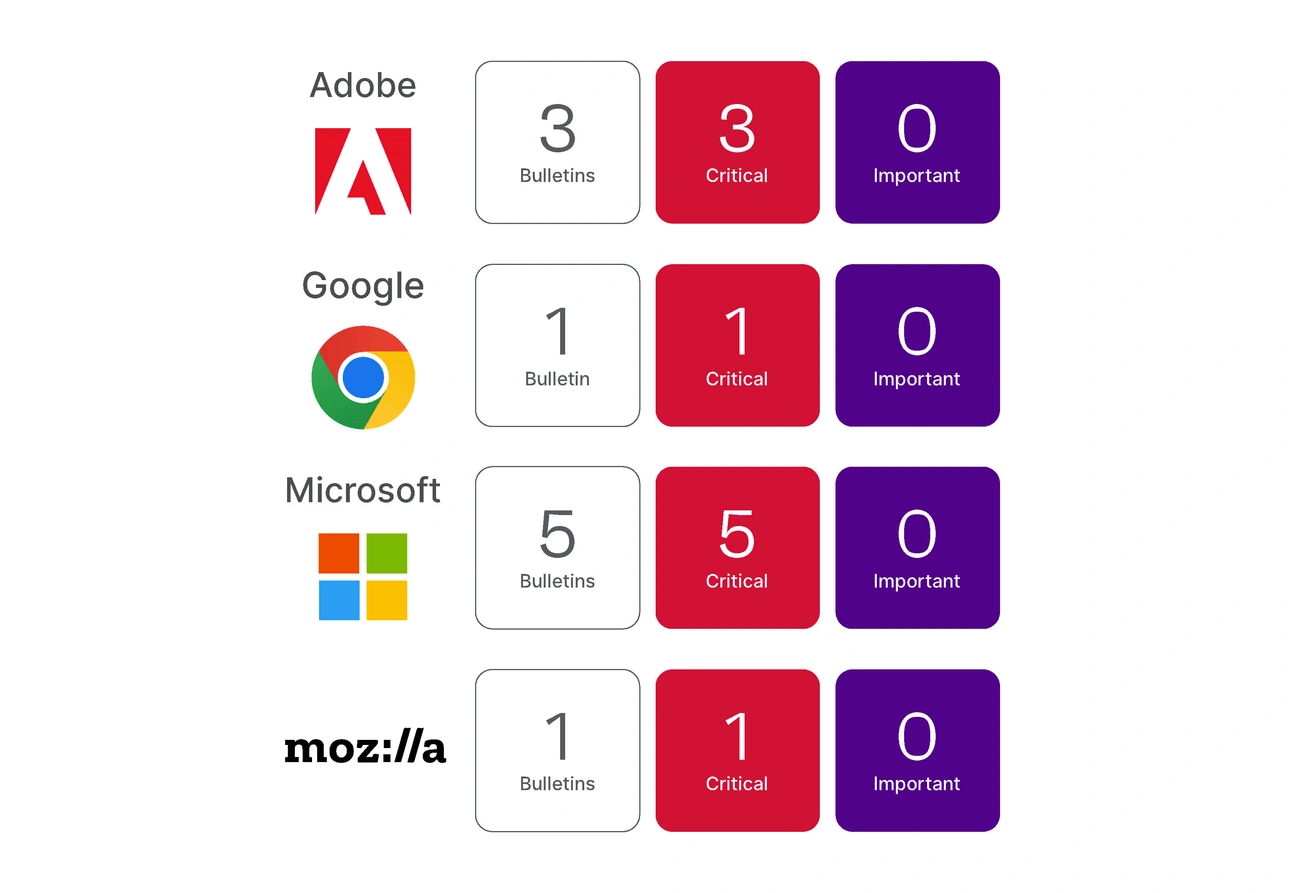
Image Source: Ivanti
Vulnerability management gets harder every day as threats keep changing. Organizations faced more than 21,000 new CVEs in just the first six months of 2025. That’s about 133 new flaws each day. Security teams protecting critical infrastructure now face unprecedented challenges because of this massive volume.
Microsoft Severity Ratings: Critical vs Important
Microsoft uses a specific rating system to help organizations decide which patches to apply first. Their system splits vulnerabilities into two main categories based on potential damage:
Critical: These flaws let attackers run code without any user action. This includes self-spreading malware or everyday situations where code runs without warnings – like when you browse a website or open an email. These need fixing right away.
Important: These vulnerabilities can put user data at risk or disrupt system resources. They usually need some user interaction with warnings showing up first. Microsoft says you should fix these “at your earliest chance”.
The system sounds good, but Microsoft’s severity ratings don’t always match real-world exploitation risks. Teams can’t rely just on these ratings to decide what to patch first. Much of the problem lies in the fact that more than 80.7% of Microsoft vulnerabilities in the last eight years were rated “Important”. This makes it hard to figure out what’s truly risky.
Patch Tuesday and Exploit Wednesday Dynamics
Microsoft releases patches on the second Tuesday each month. This schedule helps organizations plan their updates. The predictable timing works against security too.
Attackers start looking for ways to exploit newly patched systems right after Patch Tuesday – that’s why the next day is called “Exploit Wednesday”. Security teams race against time because attackers can reverse-engineer patches and create exploits within 24 hours.
Research shows that bad actors can spot vulnerabilities by looking at the patches themselves. They use Microsoft’s fixes as a map to find vulnerable systems. A SonicWall study found that 78% of organizations don’t patch critical flaws within that crucial first day after Patch Tuesday. This leaves systems wide open during a high-risk time.
Window of Exposure: Time-to-Patch vs Time-to-Exploit
The gap between when we find a vulnerability and when it gets fixed is shrinking dangerously. Data shows attackers exploit 75% of new vulnerabilities within 19 days of discovery. They exploit 25% the same day they’re found.
The average time-to-exploit dropped from 63 days in 2018 to just 5 days in 2024. Most organizations take between 60-150 days to apply patches. This creates a big problem – attackers now weaponize flaws faster than organizations can fix them.
The 2023 MOVEit Transfer zero-day shows how fast things move. Attackers exploited it widely within 48 hours of discovery. Verizon’s Data Breach Investigations Report links about 20% of breaches to vulnerability exploitation. Mandiant’s research backs this up, noting that proof-of-concept code often appears on public sites within hours.
Organizations struggle with patching for several reasons:
- Too many flaws: 2024 saw over 40,000 new vulnerabilities, making complete patching impossible
- Hard choices: CVSS and other scoring systems often overstate risks and don’t predict real exploitation chances
- Limited resources: Emergency patches disrupt planned work and cost 30-50% more than regular updates
Attackers now use AI to find and exploit vulnerabilities within minutes of disclosure. This makes traditional vulnerability management less effective at protecting vital systems.
Cost Analysis of Patch Management in Legacy Environments
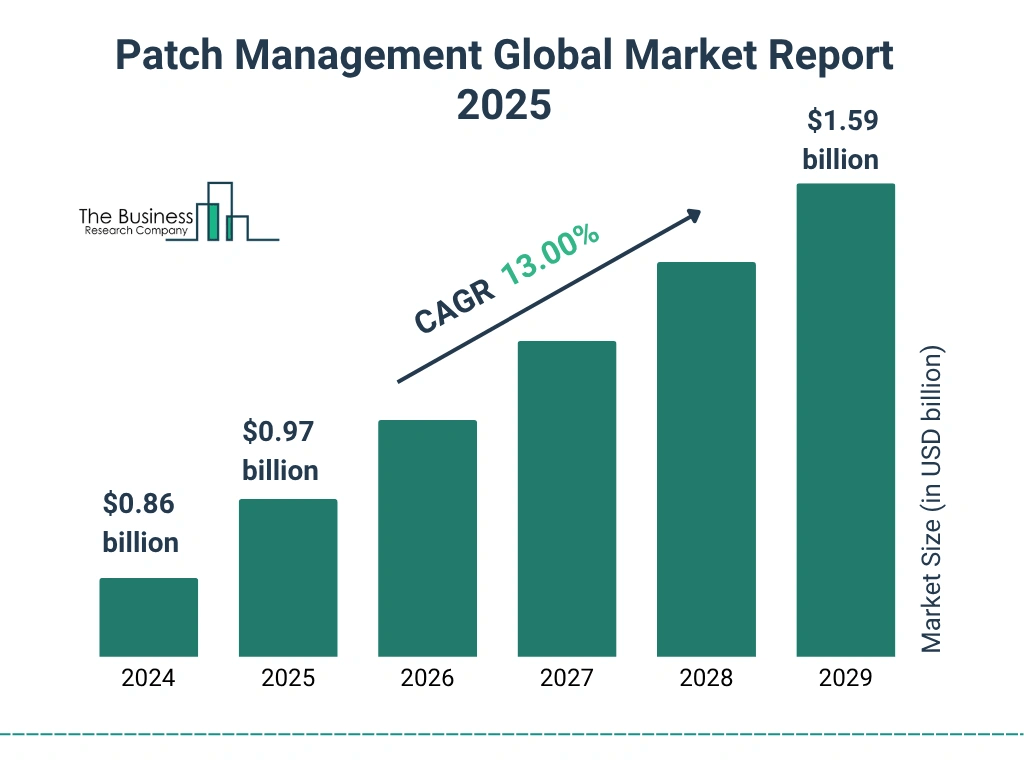
Image Source: The Business Research Company
Managing legacy infrastructure costs way beyond visible IT budget items. Companies face mounting expenses as their aging systems need more complex maintenance and security measures just to keep running.
Emergency Patch Deployment: $1M+ Cost Scenarios
Emergency patches create major financial pressure on businesses. These patches address critical vulnerabilities outside regular maintenance windows. Companies typically need five emergency patches every month, which costs nearly GBP 79,416 ($100,000) per month. Each patch takes over 12 man-hours to set up and costs about GBP 15,883 ($20,000). These numbers add up to millions of dollars yearly for enterprises with thousands of systems.
The actual costs go beyond just implementation. Companies either pay overtime to IT staff or bring in third-party teams to handle emergency patching. The whole ordeal can hit seven figures when attacks are already happening, thanks to business disruptions, data breaches, and regulatory fines.
Monthly Patch Cycle Overhead in Large Enterprises
Regular patch management takes up significant resources even in the best conditions. Three out of four IT teams spend up to 25 hours each week on patch management for legacy systems. Large environments make things more complex:
- Planning takes more time than the actual setup because multiple stakeholders need to coordinate
- Companies usually follow four-week deployment cycles through test, pre-live, production, and disaster recovery environments
- Expert knowledge gets pricier as fewer people know how to work with legacy platforms
The UK government spends almost half its yearly tech budget—about GBP 2.3 billion—to keep outdated systems running. A single legacy system costs GBP 23.82 million to run and maintain. These numbers help explain why companies worldwide spend at least GBP 0.91 trillion yearly to maintain their existing IT systems.
Custom Support vs Host-Based Protection ROI
Companies facing end-of-support deadlines must choose between expensive support extensions or new protection measures. The Royal Navy paid GBP 7.15 million to keep Windows XP running after official support ended in 2015. These custom support agreements get pricier over time while offering less protection.
Symantec Critical System Protection and similar host-based protection solutions offer a more affordable approach. They protect systems continuously whatever their patch status. The numbers tell a clear story about vulnerability management:
- Traditional patching needs constant investment and gets more expensive as systems age
- Only 31% of companies now implement security updates within 14 days, down from 43% in 2021
- Host-based protection keeps security strong without disrupting operations for emergency patches
Forrester’s research shows companies could cut hardware and operational costs by 65% by retiring legacy systems. Until then, host-based protection offers the quickest way to secure systems. Instead of patching each vulnerability, solutions like Symantec Critical System Protection create security boundaries that stop exploitation before it starts.
Most organizations waste three or more hours daily because of inefficient legacy systems, costing at least GBP 28,000 yearly. Investing in protective measures brings immediate security benefits and helps optimize operations.
Symantec Critical System Protection Architecture
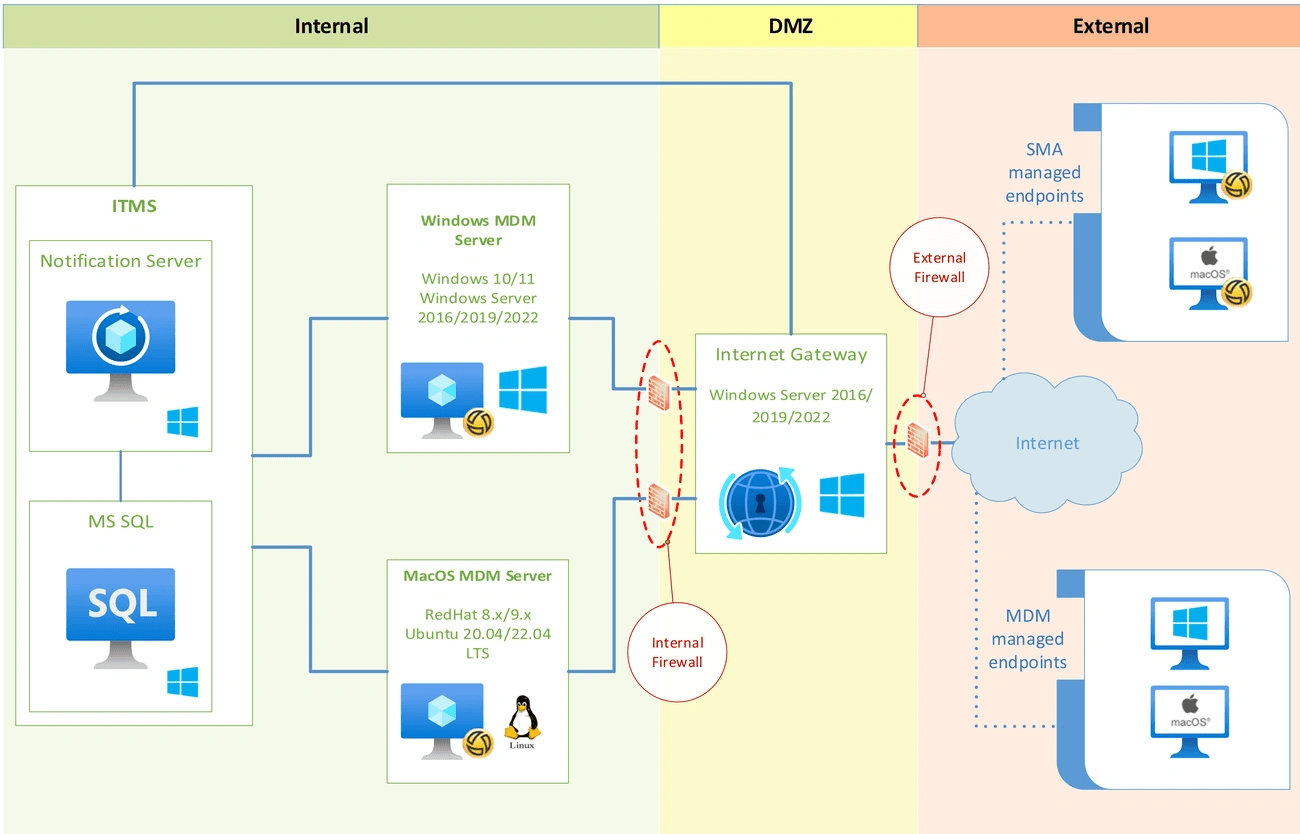
Image Source: TechDocs – Broadcom Inc.
Symantec Critical System Protection offers a complete solution that safeguards critical infrastructure against sophisticated cyber threats. Traditional security tools rely on signature-based detection. However, SCSP uses a behavior-based approach that actively shields systems without needing constant updates.
What is Symantec Critical System Protection?
Symantec Critical System Protection (SCSP) works as a policy-based host security solution that protects heterogeneous environments through prevention and detection capabilities. The system has grown from its enterprise roots to secure embedded and Internet of Things (IoT) devices. This solution combines signatureless policy-based protection with monitoring features that work in a variety of platforms—Windows, Linux, Solaris, and Real-Time Operating Systems like QNX.
SCSP protects through two main mechanisms: intrusion detection for compliance auditing and intrusion prevention for malware defense and system lockdown. This approach helps organizations implement security controls while minimizing disruption to critical operations.
Symantec Critical System Protection Agent Capabilities
The SCSP agent forms the core of the architecture and delivers key security functions at the host level:
- Exploit Prevention – Protects operating systems and applications by defining acceptable behaviors for each function. It reduces false positives through configuration-based behavioral restrictions
- System Controls – Secures configuration settings, file systems, and removable media usage to stop misuse by authorized individuals or programs
- Real-Time Monitoring – Delivers file integrity monitoring with detailed change detection of registry values, file contents, and attributes
- Access Control – Uses sandbox containment of operating system and application processes through an in-kernel reference monitor
These capabilities allow SCSP to protect systems even when they stay operational without security patches. Legacy systems benefit from this feature because traditional patching often creates operational challenges.
Out-of-the-Box Policies for Windows NT/2000/XP
SCSP has predefined policy configurations optimized for legacy Windows environments. These policies protect systems immediately without complex configuration. They ensure application compatibility while maintaining strong security.
Default policies protect against Internet Information Server attacks effectively without policy updates. SCSP blocks any injected code that tries to behave outside normal parameters. This method helps alleviate buffer overflows like it protects against other types of injected code.
SCSP policies enforce strict confinement around critical services. To name just one example, the system automatically blocks attacks that try to modify resources beyond what IIS service normally needs. The policies also stop services from launching suspicious programs, which prevents attacks from downloading and running Trojan programs.
Organizations running Windows NT/2000/XP systems can benefit from this protection at approximately 60% lower cost than custom support contracts. SCSP provides an economical solution to extend the secure operational life of legacy infrastructure.
Behavior-Based Protection and Policy Enforcement
Behavior-based protection mechanisms are the life-blood of critical system security. They focus on actions rather than signatures. Symantec Critical System Protection uses sophisticated behavioral analysis to shield vulnerable infrastructure from known and zero-day threats.
Application Whitelisting and Least Privilege Enforcement
Application whitelisting works on the Zero Trust principle and allows only pre-approved, vetted applications to run within protected environments. This approach reduces attack surfaces by a lot. It restricts tool and application usage to those that system administrators explicitly authorize. Traditional security methods try to detect malicious activity, but whitelisting prevents unauthorized software from running. This blocks potential attack vectors before exploitation happens.
Least privilege enforcement works alongside whitelisting to ensure users, applications, and processes have only the permissions they need for their functions—nothing more. This strategy reduces potential attack effects by removing extra privileges that could enable lateral movement within networks. It creates isolation boundaries around critical components and prevents compromised accounts from escalating privileges or accessing sensitive resources.
File Integrity Monitoring with Real-Time Alerts
File integrity monitoring checks operating system files, Windows registries, application software, and system files to detect suspicious changes. It creates baselines of normal states and applies cryptographic hash signatures to monitored files. The system then triggers alerts when unauthorized changes occur. Live monitoring capabilities spot potentially malicious activities right after they happen. This lets security teams respond before damage spreads.
Monitoring goes beyond simple file observation. It tracks who made changes and what content changed. This accountability feature is a great way to get proof that changes were authorized and followed approved processes.
Blocking Registry Modifications and Executable Drops
Registry protection stops unauthorized changes to critical Windows configuration settings. Registry alterations without proper safeguards can cause severe system instability or enable privilege escalation. This protection layer restricts access to regedit.exe and blocks modification attempts from suspicious processes.
Executable drop prevention stops applications from placing malicious files on protected systems. This control blocks Office applications from creating executable content that might persist after system reboots. It eliminates a common persistence technique that advanced threats use.
Real-World Exploit Mitigation with CSP
Analysis of historic cyber threats shows how Symantec Critical System Protection effectively prevents sophisticated attacks without traditional patches. Case studies show CSP’s robust protection against system exploitation through behavior-based controls.
Blaster Worm Containment via RPC Policy
Security researchers found the Blaster worm in August 2003. It exploited DCOM RPC vulnerabilities on TCP port 135 and we targeted Windows 2000 and XP systems. The worm tried to download msblast.exe to the system32 directory and launched denial-of-service attacks against Windows Update servers. More than 100,000 Microsoft Windows systems fell victim to this worm in its first week.
CSP neutralizes this threat with RPC policy controls that block suspicious port activity. The system’s default policies prevent exploitation by restricting the worm’s network connections and blocking execution of dropped files, even without the MS03-026 security patch.
Stuxnet Attack Vector Blocking with Default Rules
Stuxnet marked a turning point in targeted cyber attacks. This advanced malware used multiple zero-day vulnerabilities, including a Windows shortcut ‘LNK/PIF’ vulnerability that allowed auto-execution from removable drives. Networks became infected through Print Spooler and SMB vulnerabilities.
CSP’s default policies automatically block Stuxnet’s core behaviors:
- Preventing registry modifications attempted by compromised processes
- Blocking driver installations using stolen certificates
- Restricting TFTP functionality used for propagation
- Preventing privilege escalation attempts through kernel exploits
IIS Exploit Prevention through Network Isolation
Attackers frequently target Internet Information Server with buffer overflow attacks. CSP protects against IIS exploits through network isolation techniques:
- Blocking incoming connections from untrusted networks
- Restricting IIS service from launching suspicious programs
- Preventing modifications to system files and registry values
- Monitoring URL requests to detect attack signatures
These protective measures help CSP establish defense-in-depth security without emergency patching or system downtime.
Conclusion
Symantec Critical System Protection’s upcoming end-of-life date creates major challenges for organizations that depend on this robust security solution. CSP has protected critical infrastructure through its behavior-based approach instead of traditional signature detection. This method protects systems against known and zero-day threats without needing constant updates or emergency patches.
Organizations need to assess their security strategies as 2025 approaches. Time-to-exploit windows have dropped drastically to 5 days from 63 days in 2018. The security landscape has become more complex with over 21,000 new CVEs emerging in just six months, making detailed patching unrealistic for many teams.
Money matters shape security decisions too. Emergency patches cost companies around $100,000 each month. Legacy system maintenance takes up to 50% of technology budgets in some cases. These numbers show why host-based protection solutions work better than custom support agreements for end-of-life systems.
CSP’s architecture stands out because of its detailed agent capabilities – exploit prevention, system controls, immediate monitoring, and access control. Default policies designed for legacy Windows environments protect against common attack vectors without complex configuration.
Real-life examples prove CSP works well. The solution reduced threats like the Blaster worm and Stuxnet by using behavior-based controls that block suspicious activities whatever the exploit used. This protection works without emergency patches or system downtime.
The time has come to prepare for the post-CSP digital world. Though the solution starts its end-of-life process soon, its security principles remain vital. Behavior-based protection, least privilege enforcement, and application whitelisting are the foundations of future infrastructure protection strategies. Companies going through this change should look for solutions that focus on proactive security controls rather than reactive patching cycles.
CSP’s approach will reshape the scene of critical system protection beyond 2025. Security teams should find solutions that offer similar protection through behavior analysis, policy enforcement, and immediate monitoring. This preparation will help organizations face the next wave of infrastructure security challenges head-on.
FAQs
1. What are the main security risks for unsupported infrastructure in 2025?
Unsupported infrastructure faces increased vulnerability to cyberattacks, lack of security updates, and potential compliance issues. Without regular patches, systems become more susceptible to malware and zero-day exploits, creating significant business risks.
2. How has the window of exposure for vulnerabilities changed in recent years?
The average time-to-exploit has dramatically decreased from 63 days in 2018 to just 5 days in 2024. This means attackers can now weaponize vulnerabilities much faster than most organizations can patch them, creating a critical security challenge.
3. What are the financial implications of maintaining legacy systems?
Maintaining legacy systems can be extremely costly. Organizations may spend up to 50% of their technology budgets on legacy system maintenance. Emergency patches alone can cost around $100,000 monthly, while operating a single legacy system may cost over $30 million annually.
4. How does behavior-based protection differ from traditional security approaches?
Behavior-based protection focuses on actions rather than signatures, allowing it to defend against both known and unknown threats. It uses techniques like application whitelisting, least privilege enforcement, and real-time monitoring to prevent unauthorized activities without requiring constant updates.
5. What are some key features of Symantec Critical System Protection?
Symantec Critical System Protection offers exploit prevention, system controls, real-time monitoring, and access control. It provides out-of-the-box policies for legacy Windows environments and can protect systems even when they cannot be taken offline for patching, making it particularly valuable for critical infrastructure.